
Vue To Nuxt: Part 1
The starting point of my Nuxt 4 journey, from plain Vue apps to a more complete framework.

A few months ago, Vue felt complete. Components rendered, state flowed, everything worked. But then reality hit: every new project needed SEO, server rendering, or a consistent folder structure. Same problems, every time. Hours spent on repetitive setup instead of building features. That friction is what led me to Nuxt.
What Is Nuxt
Nuxt is a framework built on top of Vue.js that adds structure, conventions, and production-ready features out of the box. **In plain Vue, building an app usually means :
**- Setting up Vite manually.
- Installing and configuring Vue Router.
- Adding a library for meta tags and SEO.
- Creating a folder structure from scratch.
- If SSR is needed, figuring out a completely separate setup.
Nuxt replaces all of that with a single, opinionated framework. After running one command, the project already has:
- File-based routing: drop a .vue file in pages, and it becomes a route.
- SSR and SSG support: server-side rendering or static generation, configurable without rewriting the app.
- Auto-imports: components, composables, and utilities are available without manual imports.
You don’t need
import Button from '@/components/Button'.components are available globally.
- A server directory: backend API routes live in the same codebase as the frontend.
- Built-in SEO tools: useHead handles meta tags, Open Graph.
The mental shift is simple: Vue handles components, Nuxt handles everything around them.
Understanding Nuxt’s Rendering Modes
Before going deeper into Nuxt, it helps to understand the three rendering modes it supports. These aren’t abstract concepts—they directly affect SEO, performance, and how the app gets deployed.
SPA: Single-Page Application
This is how most Vue apps work by default.
- The browser downloads a minimal HTML file (empty).
- JavaScript loads, Vue mounts, and everything renders on the client side.
- Navigation happens without full-page reloads.
SSR: Server-Side Rendering
With SSR, the server runs Vue and sends fully rendered HTML to the browser.
- The user sees content immediately.
- Vue then hydrates the page—attaching interactivity to the already-visible HTML
SSG: Static Site Generation
SSG is like SSR, but it happens at build time instead of request time.
- During the build, Nuxt generates static HTML files for every route
- At runtime, those files are served directly—no Node.js server needed
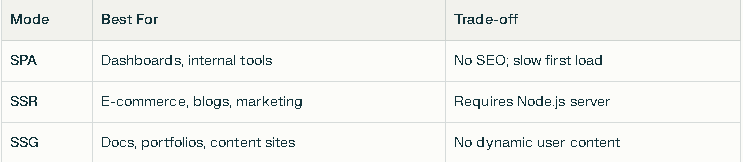
Rendering Modes: Pros & Cons
Why This Matters in Nuxt ?
Nuxt supports all three modes—and switching between them is often just a config change. Starting with SPA is fine. Later, if SEO becomes important, flipping to SSR or SSG doesn’t require a rewrite. That flexibility is one of the main reasons Nuxt felt like a smart investment.
Why I Choose Nuxt Over Plain Vue
There were a few specific pain points that pushed me toward Nuxt:
1. Routing was always repetitive. In plain Vue, every new page means editing a router file, importing the component, and adding a route object. In Nuxt, creating pages — about.vue — automatically creates the about route. No config, no imports.
2. SEO was always an afterthought. Adding meta tags in Vue requires extra libraries and manual setup. In Nuxt, useHead is built in and works with SSR out of the box. Setting an Open Graph image takes one line.
In plain Vue, adding an Open Graph preview image meant finding a library, installing it, configuring it. In Nuxt, it’s:
*useHead({ ogImage: '/preview.jpg' })*. One line.
3. Project structure was inconsistent. Every Vue project had a slightly different folder layout. Nuxt enforces conventions: pages for routes, components for components, layouts for layouts, server for backend logic. It’s predictable across projects.
4. SSR felt intimidating. Setting up SSR manually in Vue is complex. In Nuxt, it’s the default behavior. The framework handles hydration, data fetching, and server–client coordination without extra effort.
A Quick Comparison: Plain Vue vs Nuxt
Here’s what the folder structure looks like in both setups.
Plain Vue with Vite:
- my-vue-app/
src/
router/
index.js (Manual route)
views/
Home.vue
About.vue
components/
App.vue
index.html
vite.config.js
Nuxt 4:
- my-nuxt-app/
app.vue (Root component)
pages/
index.vue (/ route)
about.vue (about route)
components/ (Auto-imported)
layouts/ (Shared page layouts)
server/api/ (Backend routes)
nuxt.config.ts (Single config file)
You can see that The Nuxt version is flatter, more predictable, and requires less manual wiring.
When Nuxt Makes Sense (And When It Doesn’t)
Not every project needs Nuxt. Here’s how I think about it now.
Nuxt shines for**:**
- Public-facing websites where SEO matters: blogs, portfolios, landing pages
- Apps that benefit from fast initial loads: e-commerce, media sites
- Projects where frontend and simple backend logic can live together: contact forms, basic APIs
- Teams that want consistent structure across multiple Vue projects
Plain Vue might still be fine for:
- Internal dashboards behind authentication
- Prototypes and experiments
- Apps where SEO is irrelevant and bundle size is the priority
For my own projects — mostly public-facing tools and content sites — Nuxt now feels like the obvious starting point.
Common Pitfalls: What I Learned Early
Even before writing real code, a few lessons became clear.
Pitfall 1: Thinking Nuxt is too heavy for small projects.
Nuxt adds features, but it also removes boilerplate. For a simple portfolio site, the setup is actually faster than wiring up Vue + Vue Router + a meta library manually.
Pitfall 2: The Nuxt Version Confusion (2 vs 3 vs 4).
Nuxt 2 was based on Vue 2 and had a different structure. Nuxt 3 introduced Vue 3, Composition API, and a new architecture. Nuxt 4 continues that direction with refinements. When searching for tutorials, it’s important to check which version they target — Nuxt 2 patterns don’t apply anymore.
Pitfall 3: Skipping the why and jumping straight to code.
Understanding SPA vs SSR vs SSG — and when each makes sense — saves confusion later. Nuxt’s defaults are SSR, and knowing why helps when debugging hydration issues or choosing deployment platforms.
Summary: What’s Next
Here’s what this first article covered:
- Nuxt is Vue with production features built in: routing, rendering modes, SEO, server routes, and project structure.
- SPA, SSR, and SSG aren’t just buzzwords — they affect SEO, performance, and deployment choices.
- Nuxt supports all three rendering modes, and switching between them doesn’t require a rewrite.
- Compared to plain Vue, Nuxt removes repetitive setup and enforces helpful conventions.
- For public-facing apps where SEO and performance matter, Nuxt is a strong default choice.
This was the starting point of understanding what Nuxt is and why it’s worth learning.
Next in this journey is Part 2, where a fresh Nuxt 4 project gets created from scratch. That article will cover checking the Node.js version, running the official create command, exploring the generated folders, and running the dev server for the first time.